
NETWORKING • TECH EXPLAINED
Switch vs. Router: What’s the Real Difference?
Two essential networking devices. Different jobs. Learn what each does, how traffic moves between networks, and how to explain the difference confidently in an interview.
By Isaac Danso-Gyan (Coach Ike) • Practical networking education
The short answer
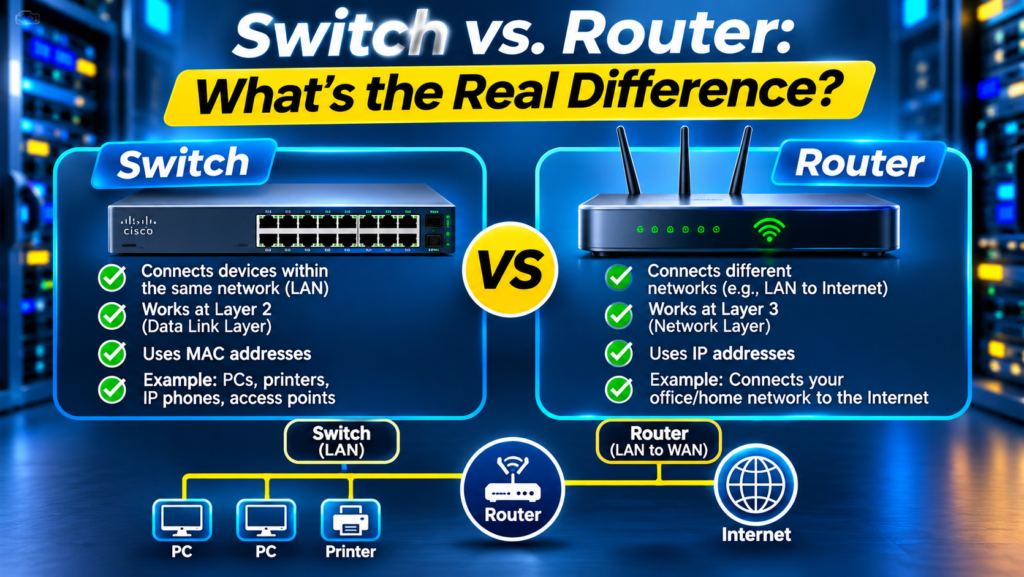
A switch primarily connects devices within a local area network (LAN), forwarding Ethernet frames based on MAC addresses. A router connects different IP networks and forwards packets based on destination IP addresses and routing information.
That is the core difference, but modern enterprise switches can also perform Layer 3 routing. So the most accurate explanation is about the function being performed—not simply the shape of the box.
1. What does a network switch do?
Imagine an office with 20 computers, printers, access points, and IP phones. A switch provides Ethernet connectivity so those devices can communicate on the local network.
A typical Layer 2 switch learns which source MAC addresses are reachable through which ports and stores them in a MAC address table (also called a CAM table). When it receives a frame, it uses the destination MAC address to decide where to forward it.
If the destination MAC is unknown, the switch normally floods the frame within the relevant VLAN, except the incoming port. Broadcast frames are also generally flooded within that VLAN.
- Primary decision: destination MAC address.
- Typical scope: devices in the same VLAN or Layer 2 broadcast domain.
- Common features: VLANs, trunking, port security, Power over Ethernet (on supported models), and link aggregation.
- Example: a PC communicating with a printer in the same VLAN.
2. What does a router do?
A router forwards IP packets between distinct IP networks. For example, your office network might use 192.168.10.0/24 while a server network uses 192.168.20.0/24. Communication between those subnets requires Layer 3 forwarding by a router or Layer 3 switch.
A router checks the destination IP address and consults its routing table to choose a next hop or outgoing interface. It may learn routes through directly connected interfaces, static routes, or routing protocols such as OSPF and BGP.
A home router often combines several functions in one device: routing, NAT, firewalling, a small Ethernet switch, and Wi-Fi. These are separate functions even when they share one enclosure.
- Primary decision: destination IP address and routing table.
- Typical scope: connecting different subnets, sites, or the internet.
- Common features: static and dynamic routing, NAT, WAN connectivity, and access control policies.
- Example: a laptop accessing a website outside its local subnet.
3. Switch vs. router: side-by-side comparison
Switch: usually forwards Layer 2 Ethernet frames within a VLAN using MAC addresses; commonly connects endpoints and network infrastructure inside a LAN.
Router: forwards Layer 3 IP packets between networks using destination IP addresses and routes; commonly connects VLANs, branches, data centers, and WANs.
Important exception: a multilayer or Layer 3 switch can route between VLANs using switched virtual interfaces (SVIs). Likewise, a router may include integrated switch ports. Device labels do not always reveal every capability.
4. How traffic moves: same VLAN vs. different VLANs
Scenario A — Same VLAN: PC-A (192.168.10.10/24) sends data to PC-B (192.168.10.20/24). PC-A resolves PC-B’s MAC address using ARP (for IPv4), and the switch forwards the Ethernet frame toward PC-B. No routing is needed for this local exchange.
Scenario B — Different VLANs: PC-A (192.168.10.10/24) sends data to Server-B (192.168.20.20/24). PC-A recognizes the destination is outside its subnet and sends the frame to its default gateway. A router or Layer 3 switch forwards the IP packet toward the server’s subnet.
The IP source and destination normally remain the same across this routing step, while the Layer 2 headers are rewritten for the next link. NAT, when configured, is a separate operation that can change IP addressing.
5. What are VLANs and why do they matter?
A VLAN creates a separate logical Layer 2 broadcast domain on switching infrastructure. For example, a business might place staff computers in VLAN 10, voice phones in VLAN 20, and guest devices in VLAN 30.
Devices in different VLANs do not communicate through ordinary Layer 2 switching alone. They need inter-VLAN routing, usually provided by a router-on-a-stick design or a Layer 3 switch with SVIs.
VLAN separation is useful for organization and segmentation, but VLANs alone are not a complete security policy. Access control lists or firewalls may be required to restrict traffic between networks.
6. What about wireless routers and access points?
A wireless access point provides Wi-Fi connectivity and commonly bridges wireless clients into a wired LAN. A consumer Wi-Fi router usually combines an access point, router, Ethernet switch, and firewall/NAT services.
In larger organizations, dedicated switches, routers, wireless access points, and firewalls are often separate devices or virtualized functions for scale, management, and security.
7. Practical lab: see the difference yourself
Build a small topology in Cisco Packet Tracer, GNS3, EVE-NG, or with real equipment. Start with two PCs on one switch in the same subnet. Verify they can ping each other, then inspect the switch MAC address table.
Next, place a third PC in another subnet. Add a router or configure inter-VLAN routing on a Layer 3 switch. Set correct default gateways, verify connectivity, and inspect the routing table.
Finally, intentionally introduce an error—wrong subnet mask, missing default gateway, wrong VLAN assignment, or shutdown interface—and troubleshoot it systematically.
- Useful Cisco commands: show mac address-table, show vlan brief, show interfaces status.
- Routing checks: show ip interface brief, show ip route, show running-config interface.
- Endpoint checks: ipconfig /all or ip addr, ping, traceroute/tracert, and arp -a.
- Document the topology, IP plan, test results, root cause, and final fix.
8. Common mistakes beginners make
Saying a switch connects computers and a router connects to the internet is a useful first approximation, but incomplete: switches connect many kinds of devices, and routers connect any different IP networks—not only the internet.
Another mistake is saying all switches operate only at Layer 2. Layer 3 switches can route. Also, connecting two VLANs physically does not automatically enable communication between them.
Finally, remember that a firewall and a router are not interchangeable concepts. Routing chooses paths; firewall policy determines which traffic is allowed or denied. One platform may implement both.
9. How to answer this in an IT interview
Sample answer: ‘A Layer 2 switch connects devices in the same LAN or VLAN and forwards Ethernet frames using MAC addresses. A router connects different IP networks and forwards packets using IP addresses and a routing table. For example, two PCs in VLAN 10 can communicate through a switch, but reaching a server in VLAN 20 requires inter-VLAN routing through a router or Layer 3 switch.’
To strengthen your answer, mention a lab you completed and explain how you verified forwarding and routing. Interviewers often value clear reasoning and practical evidence more than memorized definitions.
10. Quick knowledge check
Question 1: Two PCs are in the same VLAN and subnet. Which function primarily forwards their frames? Answer: Layer 2 switching.
Question 2: A PC needs to reach a different IP subnet. What does it normally use? Answer: its configured default gateway.
Question 3: Can a switch perform routing? Answer: yes, a Layer 3 switch can route between networks when configured.
Question 4: Does creating VLANs automatically block all inter-VLAN traffic? Answer: no; routing and security policy determine whether traffic can cross VLANs.
Frequently asked questions
Do I need a router for two computers to communicate? Not if they are on the same local Layer 2 network and correctly addressed; a switch can provide their connectivity.
Is a switch faster than a router? Performance depends on the hardware, software, configuration, and workload. Modern switches and routers can both forward traffic at high speed.
Can a Layer 3 switch replace a router? For many internal routing tasks, yes. WAN edge features, provider connectivity, NAT, or specialized services may still require other devices or platforms.
Should beginners learn switching or routing first? Learn basic IP addressing and Ethernet, then Layer 2 switching, VLANs, default gateways, and routing. Practice them together in labs.
Ready to move from theory to hands-on networking?
Network Professional Training Center (NPTC) offers practical training, labs, projects, and mentorship for aspiring network and security professionals.
About the author
Isaac Danso-Gyan (Coach Ike) is an IT Career Coach, Network & Security Consultant, author, and founder of Network Professional Training Center (NPTC). He helps learners connect networking concepts to practical skills and career opportunities.