
CYBERSECURITY • NETWORK SECURITY
VPN vs. Firewall: Which Protects What?
A practical guide to understanding encrypted connections, traffic filtering, secure remote access, and how these technologies work together.
By Isaac Danso-Gyan | Coach Ike · IT Career Coach • Network & Security Consultant • Author
Introduction: Two Different Security Jobs
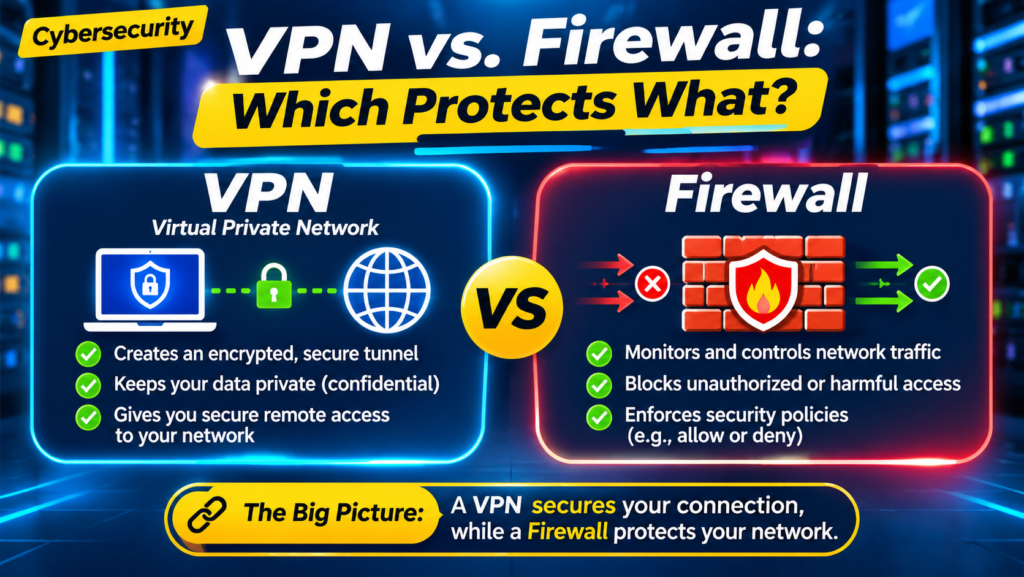
VPNs and firewalls are often mentioned together, but they solve different problems. A virtual private network (VPN) creates an encrypted tunnel between endpoints or networks. A firewall evaluates traffic against security rules and decides what to allow, block, or inspect.
Neither tool is a complete security solution by itself. Understanding where each operates helps you design safer networks, troubleshoot connectivity, and answer technical interview questions with confidence.
1. What Is a VPN?
A VPN uses tunneling and, in most modern deployments, encryption to protect traffic across an untrusted network such as the public Internet. It can connect a remote employee to a company network (remote-access VPN) or link two sites (site-to-site VPN).
Common technologies include IPsec and SSL/TLS-based VPNs. A VPN protects data in transit between its tunnel endpoints, but traffic may be unencrypted after it leaves the tunnel endpoint unless another protocol such as HTTPS protects it.
Example: Remote employee
A worker connects from a hotel to a company VPN gateway. The VPN authenticates the connection and encrypts traffic across the Internet. Access to internal applications is still governed by network and identity policies.
2. What Is a Firewall?
A firewall enforces security policy by inspecting and controlling network traffic. Depending on the product and configuration, it can filter by source/destination IP, port, protocol, connection state, application, user identity, and threat indicators.
A basic stateful firewall tracks connections and allows legitimate return traffic. A next-generation firewall (NGFW) may also offer application awareness, intrusion prevention, URL filtering, and malware-related controls. These features depend on licensing, configuration, and traffic visibility.
Example: Restricting access
A company firewall may permit employees to browse HTTPS websites while denying unauthorized inbound connections to internal servers. The firewall does not automatically encrypt all allowed traffic.
3. VPN vs. Firewall — Side-by-Side
Primary purpose: VPN = secure tunneling and protected transport; Firewall = traffic control and policy enforcement.
Typical decision: VPN = can this endpoint establish an authenticated secure tunnel? Firewall = is this traffic permitted under policy?
Encryption: VPN usually encrypts tunnel traffic; a firewall does not inherently encrypt ordinary traffic, although many firewall appliances also terminate VPN tunnels.
Where used: VPN = remote access, branch connectivity, secure transit; Firewall = perimeter, internal segmentation, cloud network boundaries, and endpoint protection.
Important limitation: A VPN does not guarantee a device is safe; a firewall cannot protect data confidentiality on an untrusted link without encryption.
4. How They Work Together
Consider an employee connecting from home to an internal file server. First, the VPN client authenticates and establishes an encrypted tunnel to the VPN gateway. Next, firewall policy evaluates whether the authenticated user and assigned VPN address can reach the file server. The server may apply additional access controls.
Conceptual traffic path: Remote laptop → encrypted VPN tunnel → VPN gateway/firewall → permitted internal network segment → application server.
A single physical security appliance can provide both VPN termination and firewall services. The functions are still distinct, even when delivered by one product.
5. Common VPN Types
Remote-access VPN: Connects an individual user or device to organizational resources. It commonly uses identity authentication and may check device posture.
Site-to-site VPN: Connects networks at different offices or cloud environments, often using IPsec.
Split tunnel: Only selected traffic goes through the VPN; other traffic uses the local Internet connection. This can reduce load but requires deliberate security policy.
Full tunnel: Most or all client traffic is routed through the VPN gateway for centralized inspection or access. Behavior depends on configuration.
6. Firewall Types and Capabilities
Packet-filtering ACL: Matches IP addresses, protocols, and ports against permit/deny rules.
Stateful firewall: Maintains connection state to distinguish established return traffic from unsolicited traffic.
Next-generation firewall: Adds application-aware and threat-prevention capabilities where supported.
Host-based firewall: Runs on a computer or server to enforce local inbound and outbound rules.
Cloud firewall/security controls: Protect workloads and networks in cloud environments; capabilities differ across providers.
7. Practical Troubleshooting: VPN Connects but App Fails
A successful VPN connection does not guarantee application access. Troubleshoot systematically rather than immediately changing security rules.
Step 1 — Define the symptom
Can the user authenticate? Does the tunnel establish? Is the problem limited to one application, user, or site?
Step 2 — Verify addressing and routes
Check the VPN-assigned IP, route table, split-tunnel routes, and DNS resolution. Confirm the destination subnet is reachable through the intended path.
Step 3 — Check policy and logs
Review firewall rules, identity groups, NAT exemptions where applicable, and traffic logs for denies. Verify that return traffic has a valid route.
Step 4 — Test and document
Use approved tools such as ping (if permitted), traceroute, nslookup/dig, and application-specific connectivity tests. Record the root cause and validated fix.
8. Hands-On Lab: Compare VPN and Firewall Controls
Lab A — Firewall: In an isolated lab, create two VLANs/subnets and allow one approved service between them while blocking another. Test before and after the policy change; examine logs.
Lab B — VPN: Establish a test remote-access or site-to-site VPN in a lab environment. Confirm tunnel establishment, routes, DNS behavior, and permitted resources.
Lab C — Combined: Connect through the VPN, then restrict access to one internal service using firewall policy. Demonstrate that tunnel success and resource authorization are separate outcomes.
Document the topology, IP plan, configuration assumptions, screenshots or command output, and your test results. Never test against networks without authorization.
9. Interview Questions and Strong Answers
Q: Does a VPN replace a firewall?
No. A VPN protects traffic between tunnel endpoints, while a firewall enforces rules governing what traffic is allowed. Many deployments need both.
Q: Does a firewall encrypt traffic?
Not by default. A firewall can inspect and filter traffic; some firewall platforms also provide VPN services that encrypt tunneled traffic.
Q: A user connects to the VPN but cannot reach a server. What do you check?
I verify tunnel status and assigned address, DNS, client routes, firewall policy and logs, NAT where relevant, server-side controls, and the return path. I isolate the failure before changing configuration.
Q: Is a VPN enough to make public Wi-Fi safe?
A VPN can reduce exposure of tunneled traffic on the local network, but it does not stop phishing, malware, unsafe endpoints, or every form of tracking. HTTPS and good device security still matter.
10. Common Misconceptions
Myth: VPN means anonymous online. Reality: A VPN changes who can observe some network traffic, but does not guarantee anonymity.
Myth: A firewall blocks every cyberattack. Reality: Security also depends on identity, endpoint protection, patching, monitoring, and user behavior.
Myth: If the VPN is connected, every internal system should be accessible. Reality: Authorization and segmentation should still limit access.
Myth: Encrypted traffic cannot be controlled. Reality: Firewalls can apply policy using metadata and, where authorized and configured, additional inspection capabilities.
11. A Seven-Day Learning Plan
Day 1: Review IP addressing, ports, routing, and the TCP/IP model.
Day 2: Learn ACLs, stateful inspection, and security zones.
Day 3: Study VPN tunnels, authentication, and encryption basics.
Day 4: Draw remote-access and site-to-site VPN diagrams.
Day 5: Build a firewall policy lab and validate traffic behavior.
Day 6: Practice VPN connectivity troubleshooting using logs and routes.
Day 7: Explain VPN vs. firewall in 60 seconds and present your lab evidence.
Frequently Asked Questions
Can a firewall also be a VPN gateway? Yes. Many enterprise firewalls support VPN termination, but the features and licensing vary.
What is the difference between a VPN and HTTPS? HTTPS encrypts application traffic between a browser/client and a web service. A VPN can protect multiple types of traffic between VPN tunnel endpoints.
Do I need both for a small business? It depends on the business’s remote-access needs, network exposure, architecture, and risk assessment. Firewalls and VPNs address different needs.
Which should beginners learn first? Start with IP addressing, routing, ports, and basic firewall rules; then learn VPN fundamentals and practice how they interact.
Turn Networking Knowledge Into Practical Skills
At Network Professional Training Center (NPTC), learners can build networking and security skills through structured instruction, hands-on labs, real-world projects, mentorship, and career preparation.
About the Author
Isaac Danso-Gyan (Coach Ike) is an IT Career Coach, Network & Security Consultant, author, and founder of Network Professional Training Center (NPTC). He helps aspiring IT professionals connect technical knowledge with practical experience and career opportunities.
Key Takeaway
A VPN secures the path. A firewall controls the traffic. Together—with identity, endpoint security, monitoring, and good design—they help protect modern networks.